Design a custom hat from your phone.
No laptop, no heavy software, no APK. On Android you open CBOs in the phone browser and the whole studio is there. On iPhone and iPad you install it from the App Store. Either way you upload a logo, put it on a 1:1 3D cap, download the render and order a $60 sample from wherever you are standing.


The same studio on desktop, iPad and iPhone — and in the browser on Android.
Whatever is already in your pocket
The most common question about CBOs on Android is where to download the APK. There is no APK, and that is the good news: the browser version is the full version.
Android phone and tablet
There is no CBOs APK to hunt for. Open the studio in Chrome or Samsung Internet, design the cap, rotate it and download the renders. Nothing to install, nothing to sideload.
iPhone and iPad
Use the same studio in Safari, or install the CBOs app from the App Store, where the app is rated 4.7★ from 61 ratings on the US storefront. Verified 2026-09-10.
Desktop, when you get back to it
The project is the same file on every screen. Start a cap on the phone at work, finish it on a laptop, order the sample from either one.
Four different things people mean by a hat app
CBOs covers all four. The first one it handles differently than most people expect, so it is worth reading before you download anything.
A hat try-on app
This is not a camera filter that pastes a cap onto your selfie. You get the cap itself in 3D: turn it, look under the brim, check the back, and see the same thing a person standing behind you would see.
A hat mockup generator
Drop artwork on the cap, pick the angle and export an HD render for the product page, the ad or the pre-order post.
A hat designer app
Change the shape, the panels, the fabric, the closure and the decoration, not just the logo on a fixed blank.
An app that gets the hat made
One physical sample for $60, then production from 50 pieces per design and color. That part does not happen in a mockup app.
The phone gets the same materials, not a stripped-down menu
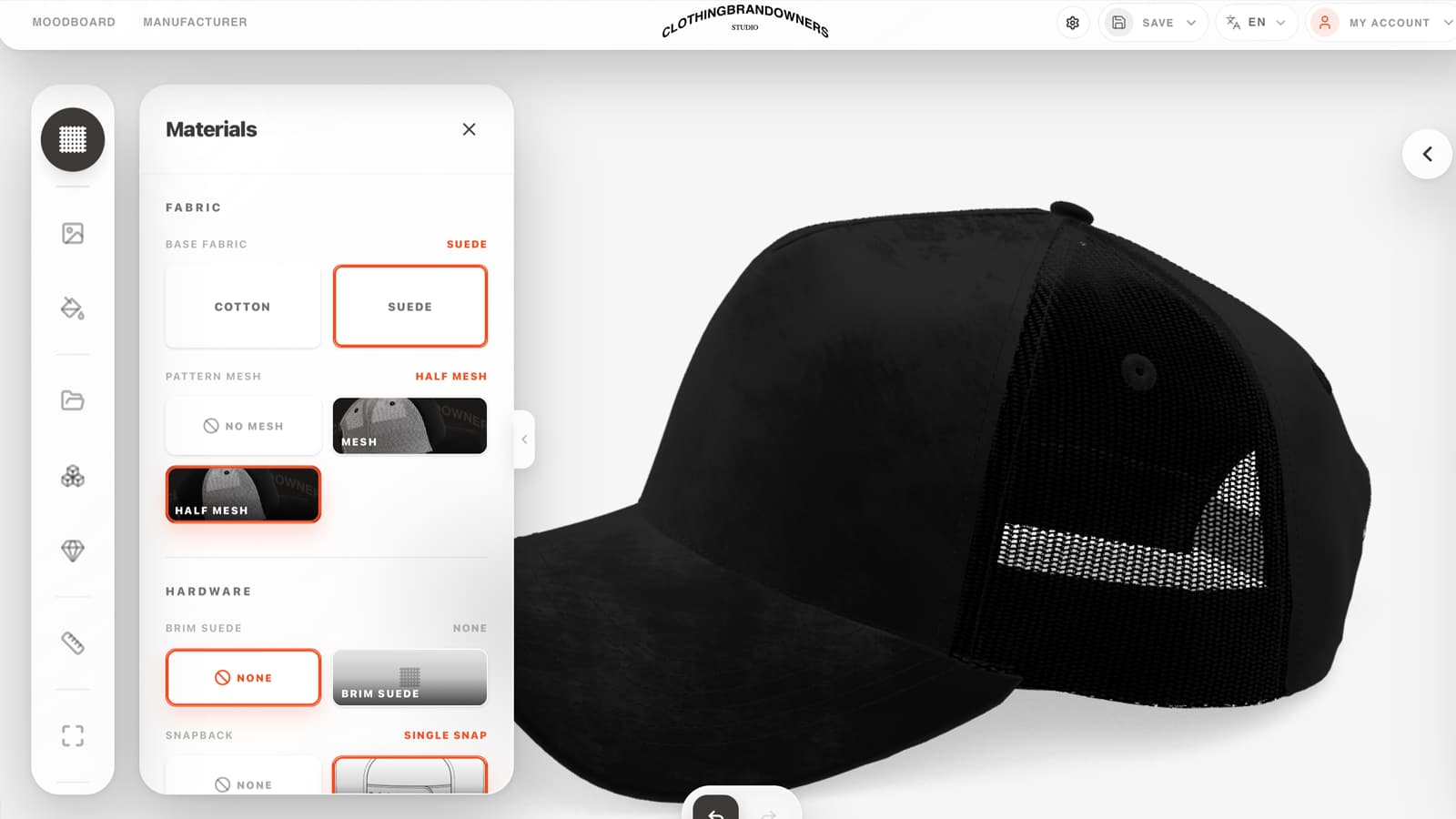
Cotton or suede, mesh or half mesh, brim overlay, snapback hardware: the choices that change what the factory makes are the same ones you get on a small screen.
From a logo in your camera roll to caps in a box
Everything up to the sample happens on the phone and costs nothing.
Open the studio in your browser
No install on Android, no account wall before you start designing. On iPhone and iPad you can install the App Store version instead.
Upload a logo or generate the artwork
Take the file out of your camera roll or your messages, clean the background off it, or make the graphic with AI if you do not have one.
Drag it onto the 1:1 3D cap
Pinch to zoom, drag to rotate, place the graphic on the front panel, the side or the back and see the scale at once.
Download the render
HD product visuals straight to the phone, ready for the store, the ad or the group chat where the decision gets made.
Order the sample
One physical cap, made from the design on your screen, so you can hold it before you commit to a run.
Produce from 50
Minimum 50 pieces per design and color, 50/50 payment, production in the USA and/or China.
The cap you approved on your phone is the cap that gets made
A mockup app hands you an image and stops. CBOs hands the approved design to production: one sample cap for $60 in about a week, then runs from 50 pieces per design and color, made in the USA and/or China.
See Sample to ProductionMobile hat design app FAQ
Is there a CBOs APK for Android?
No, and you do not need one. On Android you open CBOs in your phone browser and the full studio runs there: 3D cap, artwork upload, AI graphics, renders and the sample order. Any APK claiming to be CBOs is not from us.
Is CBOs on Google Play?
Not yet. Android runs through the browser instead, which is why there is nothing to install and no APK to find. On iPhone and iPad there is a CBOs app on the App Store.
Can I design custom hats on my phone?
Yes, start to finish. Upload or generate the artwork, place it on the 1:1 3D cap, change fabrics and decoration, download the render and order the physical sample without touching a computer.
Is this a hat try-on app?
Not in the camera-filter sense. CBOs does not paste a cap onto a photo of your head. It gives you the cap in 3D at real scale, so you rotate it, check the crown, the brim and the back, and then order one for $60 to try on for real.
Does the phone version do less than the desktop version?
It is the same studio. Fabrics, panels, embroidery, 3D puff, pins, rhinestones and renders are all there. A laptop gives you more room to move artwork around, which matters on long sessions, not on decisions.
Does it work on an iPad or an Android tablet?
Yes. Tablets get the most comfortable version of the mobile experience: a big canvas for dragging artwork and a full view of the 3D cap. iPad can also run the App Store version.
Do I need to install anything to start?
No. On Android and desktop CBOs runs in the browser. Installing is optional and only exists on iPhone and iPad, through the App Store.
Can a design made on my phone become a real cap?
Yes. The design you approve on the phone is the design that gets sampled. One cap costs $60 and takes about 7 days, and production starts at 50 pieces per design and color after you approve the sample.
Start the cap on the screen you are already holding
Designing and rendering are free in the browser. The App Store version is for iPhone and iPad.