Make the graphic you cannot draw
Describe the lettering, the mascot, the pattern or the crest and generate it as artwork. The output is a graphic you can move, scale and recolor, not a flat picture of a finished hat.
The AI makes the graphic. CBOs makes the cap. Ask an image generator for a hat and you get a picture of a hat — invented seams, panels that do not exist, nothing a factory can cut. Here the artwork goes straight onto a 1:1 3D cap, into photoreal renders and a 360 spin video that are rendered from the model instead of generated by AI, into a $60 sample in about 7 days and into a run from 50 pieces.

None of them is inventing a hat. All of them are about getting a usable graphic onto a panel.
Describe the lettering, the mascot, the pattern or the crest and generate it as artwork. The output is a graphic you can move, scale and recolor, not a flat picture of a finished hat.
Most brand files arrive as a screenshot or a JPG with a white box behind them. Remove the background, clean the edge and get a transparent version that sits on the panel instead of on a white square.
Generate variants, keep them side by side on the moodboard and pick one. Iterating costs nothing until you order the $60 sample.
The generated graphic opens in the 2D Editor with layers, text, brushes and image tools, so you can fix the one letter that came out wrong instead of re-rolling the whole thing.
Placing the artwork on the 3D cap and reviewing it is free; AI generation and HD render exports run on CBOs Pro. The first physical money you spend is the $60 sample, and by then you have already seen the graphic on the cap from every angle.
Write what you want on the cap: the words, the subject, the style. You can also start from a logo, a sketch or a reference image you already have.
Remove the background, tidy the edges and drop the parts you do not want. This is the step that decides whether the file is usable on a panel.
Drag the artwork onto the cap model and see it at real scale: front panel, side hit, back, brim. What reads well on a square canvas rarely sits right on a curved crown the first time.
Generate HD product visuals for the drop, the ad, the product page or the internal approval, before a single cap is made.
One cap, made the way the file says. This is where you find out how the AI graphic behaves in thread instead of in pixels.
After the sample is approved, produce from 50 pieces per design and color, with 50/50 payment and production in the USA and/or China.
Both start with a text box. Only one of them ends with a cap you can put on your head.
| Generic AI image generator | CBOs | |
|---|---|---|
| What you get | An image of a hat that does not exist, flattened into a single picture. | A graphic on its own layer, sized for the panel it will be embroidered on. |
| Fixing one detail | Write the prompt again and hope the rest survives. | Open the layer in the 2D Editor and edit that detail with text, brushes and image tools. |
| Seeing it on the cap | The hat in the image is the hat the model invented, with panels and seams that are not real. | The artwork sits on a 1:1 3D cap you can rotate, recolor and change materials on. |
| Getting it made | Nothing to hand a factory. | One $60 sample in about 7 days, then production from 50 pieces. |
Pink puff on camo reads differently in thread than it does on a screen. The 3D preview gets you close; the sample tells you for sure.
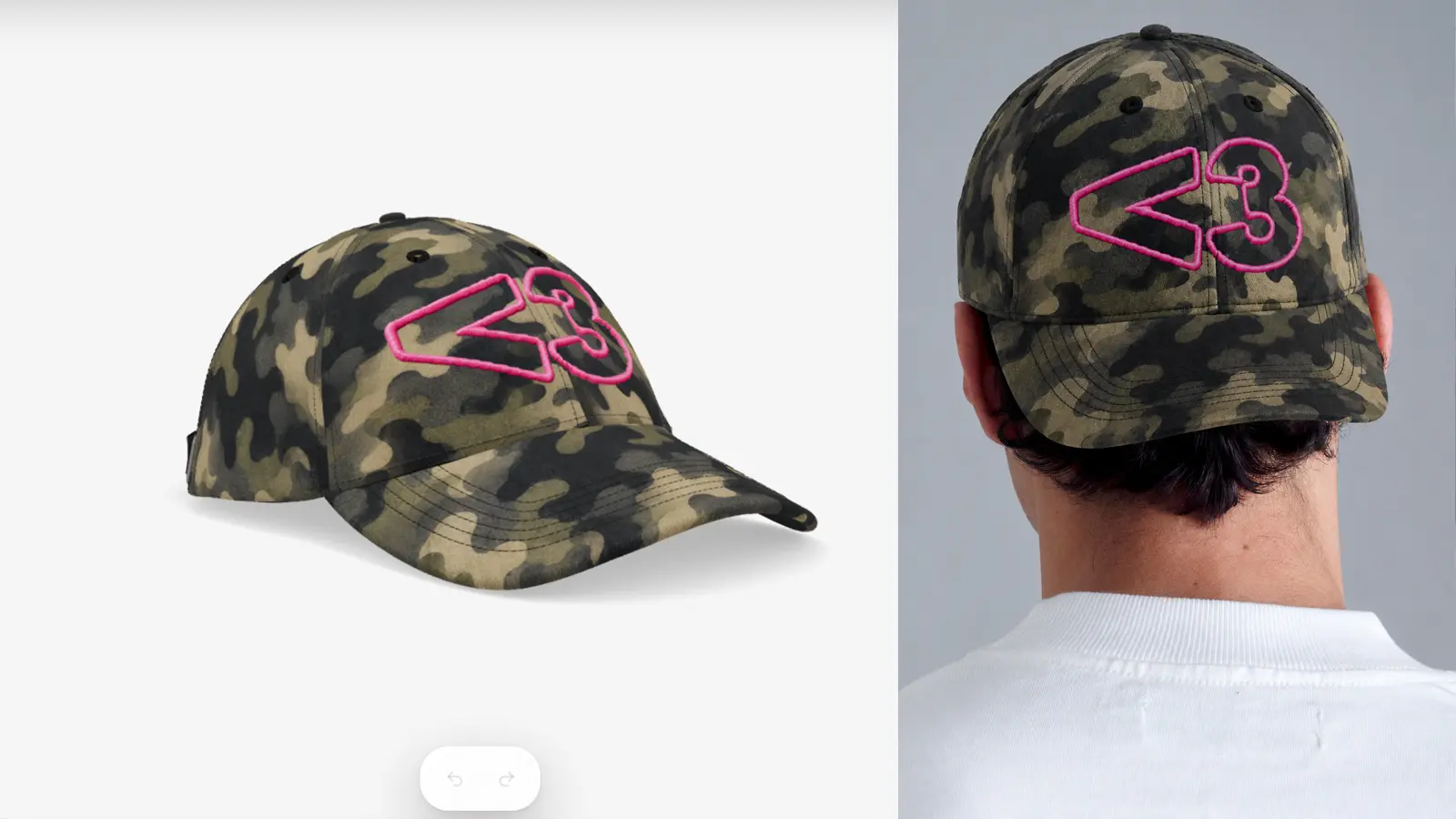
Thread color against the real fabric. How high the puff sits. Whether a hairline in the artwork survives a needle. Pin weight on the front panel. How the brim curves when the cap is on a head. A model cannot answer any of it, and neither can a render. One sample can, for $60, in about a week.
See Sample to ProductionEach of these is a different part of the same file. Start wherever your project already is.
Strip the white box off a logo and get a transparent file that sits on the panel.
Layers, text, brushes and image tools for the parts the AI got almost right.
Build the cap itself: shape, panels, fabrics, closure and colors around the artwork.
See the graphic as flat embroidery, 3D puff, woven or chenille before sampling.
Rotate the finished cap and download the mockup for the product page.
Do all of it from a phone or tablet browser, with an App Store version on iOS.
Turn the finished cap into product stills and a 360 spin rendered from the 3D model, not generated by AI.
Two things, and neither of them is an AI picture of a hat. The AI generates the artwork — lettering, a mascot, a crest, a pattern — as an editable graphic with layers. The Studio then renders the finished cap as photoreal stills and a 360 spin video from the real 3D model. The graphic is generated; the hat is rendered. That is why the same file continues into a $60 physical sample in about 7 days and a run from 50 pieces per design and colorway at $10-15 a cap.
Opening a cap model, uploading a logo, editing artwork in the 2D Editor and reviewing the design on the 3D cap are free, with no credit card. AI artwork generation and HD render exports run on CBOs Pro. The costs that are not free are physical: one sample is $60, production starts at 50 pieces per design and colorway.
AI can design the graphic that goes on the hat. It cannot decide the cap itself. In CBOs you generate or clean the artwork, then choose the shape, panels, fabric, closure and decoration on a 1:1 3D cap, and confirm the whole thing with one physical sample for $60.
Not from a prompt alone. An image generator returns a picture of a hat with invented seams and panels, and no factory can cut from it. CBOs splits the job: the AI makes the artwork, the 3D cap model carries the real construction, and the sample turns it into a physical cap in about 7 days.
Yes, after two fixes: remove the background so the graphic is transparent, and simplify the parts that are too fine to stitch. Both happen in the CBOs 2D Editor before the artwork goes on the cap.
Bold shapes and thick lettering work. Photographic gradients, hairline strokes and tiny text do not survive a needle the way they survive a screen. Preview the graphic as flat embroidery or 3D puff on the 3D cap, then confirm it on the physical sample.
Yes. The CBOs background remover strips the backdrop off logos, screenshots and reference images and returns a transparent asset ready for cap panels, patches and product renders.
No. You can skip prompting entirely and upload a logo, a sketch or a photo instead. The AI tools are there for the moment you have an idea and no file, not as the only way in.
No. The sample is what confirms fabric hand, thread color against the real material, puff height, pin weight and how the brim actually curves. One sample costs $60 and takes about 7 days, and it is the only step that answers those questions.
Opening a cap model, uploading a logo and reviewing the design in 3D is free in the browser, with no credit card. AI artwork generation and HD render exports run on CBOs Pro. The money that is not optional is physical: the $60 sample.